
 Documentation-based
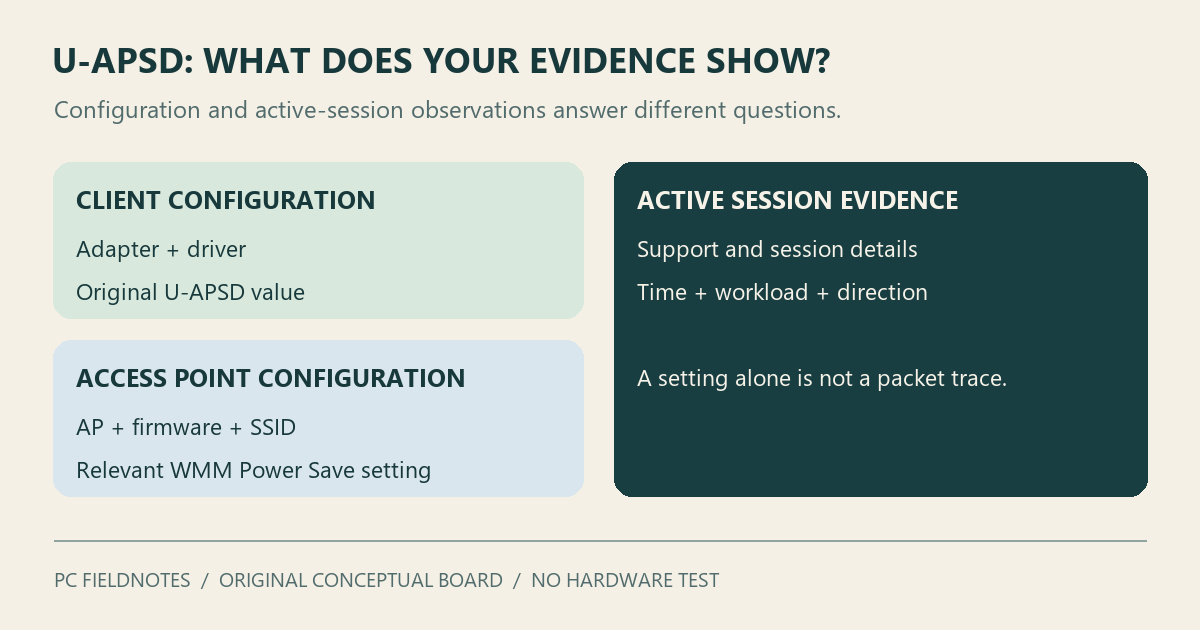
Intel legacy wireless, Cisco and Aruba documentation reviewed October 27, 2026 with AI assistance. No physical Wi-Fi, packet-capture, AP-session, battery or gaming test was performed; a virtual machine cannot verify the physical adapter/AP exchange. Alex Reed is an established pen name.
Keep the Wi-Fi adapter's original U-APSD setting if the connection works normally. If you are investigating repeatable receive slowdowns on one access point, comparing Enabled with Disabled can be useful—but record the original value and change only this setting. An online gaming preset is not evidence that your laptop needs a change.
U-APSD means Unscheduled Automatic Power Save Delivery, also called WMM Power Save. It coordinates delivery of buffered wireless traffic between a supporting client and access point. A Windows 11 adapter showing U-APSD Support: Enabled tells you about its configuration; that alone does not establish how the current wireless session is using the feature.
The access point participates in the exchange
Picture a laptop receiving periodic voice traffic. Instead of treating each queued downlink packet as a separate polling task, a participating client can send an uplink trigger and receive multiple buffered packets from the access point. This is the mechanism described in Cisco's U-APSD overview.
The intended benefit concerns power use and delivery timing for suitable traffic. It does not establish a fixed battery saving or latency improvement for your laptop. We have not measured either here.
The access point has its own capabilities and configuration. Aruba's explanation of WMM and U-APSD describes a client triggering buffered delivery with a QoS data or QoS null frame. Its SSID configuration distinguishes WMM from the associated power-save option. Those controller instructions explain the relationship; they are not instructions to apply Aruba settings to an unrelated home router.
Read three different pieces of evidence
The client setting. Save the exact adapter model, driver version and current U-APSD value. If the property is absent, do not add registry values copied from another adapter. Intel notes that available advanced properties vary with the adapter, driver and operating system.
The access point configuration. Record the router or AP model and firmware, plus the SSID and band used during the problem. If you administer the AP, consult its documentation for WMM Power Save or U-APSD support. On a workplace network, ask the administrator for the relevant client-session information instead of changing a shared SSID.
The active session. Capability and configuration are not a measurement of packet delivery. Cisco's client-detail example lists WMM support, U-APSD support, access-category information and power-save state separately. If your AP exposes comparable diagnostics, retain the exact fields and their timestamps. A Windows checkbox or a faster speed-test result cannot substitute for those observations.
This distinction also prevents a common mistake: disabling WMM on the router to test a Windows U-APSD property. That changes a broader network feature and introduces another variable. Keep the AP configuration unchanged during a client-side comparison.
What Intel's Disabled default actually establishes
Intel's legacy wireless settings page lists Disabled as the U-APSD default within that article's product scope. It also documents interoperability problems with certain access points that can reduce receive throughput.
That supports a specific troubleshooting hypothesis: an adapter/AP combination may behave differently with U-APSD disabled. It does not identify your access point as affected, establish today's default for every Windows 11 OEM driver, or prove that U-APSD causes every disconnect. Follow the instructions for your particular laptop and driver when those differ from a legacy reference.
If your recorded value is already Disabled, a recommendation to disable it again gives you no new comparison. Look for evidence that matches the actual symptom.
A comparison that includes returning to the original value
Use a short record like this before changing anything. These are fields to fill in, not results from a test we performed.
| Keep in the record | Why it matters |
|---|---|
| Adapter, driver and original U-APSD value | Identifies the configuration and rollback value |
| AP, firmware, SSID, band and laptop location | Keeps the wireless path comparable |
| AC or battery power, and the same workload | Avoids comparing different operating conditions |
| Receive and send results separately | Tests a reported receive problem without hiding direction |
| Original → changed → original results, with times | Helps distinguish a setting effect from reconnection or a changing network |
First reproduce the observation at the original value. If the OEM exposes the property and permits the comparison, change U-APSD alone and reconnect or restart as its instructions require. Run the same workload under comparable conditions. Then restore the recorded value, allow the connection to settle again, and repeat.
A single improvement immediately after reconnection is weak evidence: the comparison also changed the connection's timing. If the difference follows the U-APSD value across repeated runs, keep the record for the laptop or AP vendor. It supports a result for that combination, not a universal Windows fix. If there is no repeatable benefit, restore the original setting.
When another question should come first
If the adapter disappears, begin with Wi-Fi missing after sleep rather than assuming a buffered-delivery issue. For a connected adapter that drops sessions, use the Windows Wi-Fi report to establish the event sequence. Authentication failures need a different investigation again.
U-APSD is also separate from MIMO Power Save Mode, which concerns spatial-multiplexing power behavior. Changing both together prevents you from attributing the result to either one. This article provides no measured gaming preset or battery-life target.
Documentation reviewed October 27, 2026. This is a documentation-based explanation with an original conceptual graphic. No physical Wi-Fi, AP-session, packet-capture, battery or gaming test was performed. A virtual machine cannot verify the physical adapter/AP power-save exchange.
