
 Documentation-based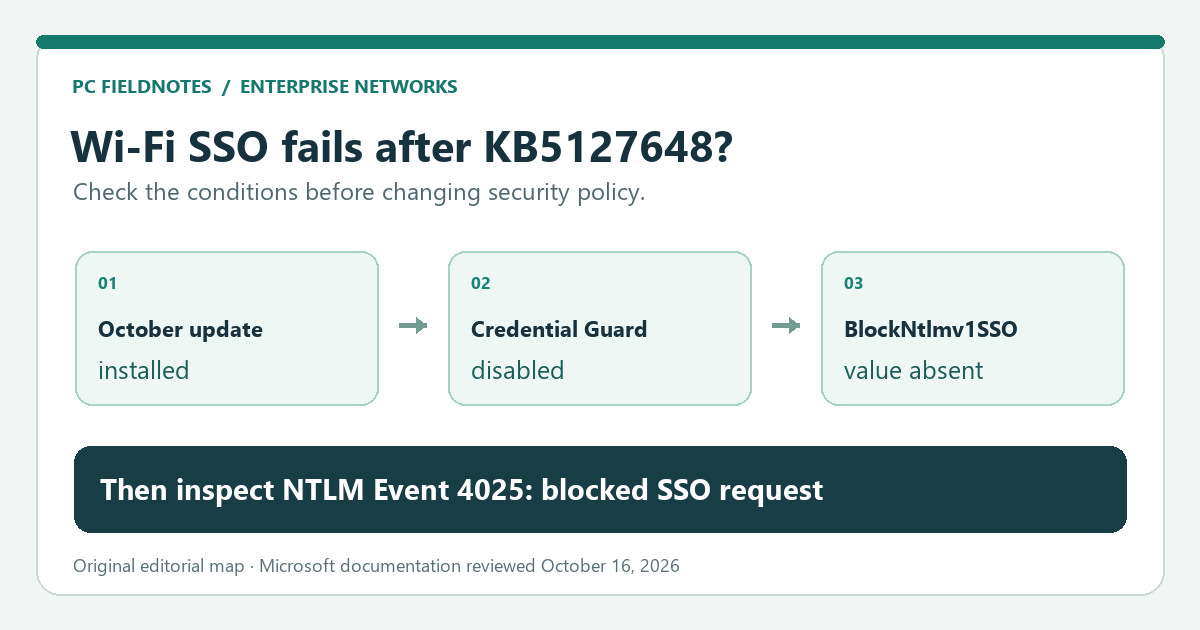
Microsoft KB5127648, KB5066470 and Credential Guard guidance reviewed October 16, 2026 with AI assistance. Documentation-based guide; no enterprise SSO failure, policy change or recovery was tested. Alex Reed is an established pen name.
If a work or school Wi-Fi network stopped connecting automatically after the October 2026 Windows update, but a prompt for your username and password still works, ask IT to check the connection's MS-CHAPv2 single sign-on (SSO) path. Microsoft's October 13 update changed the default for generating NTLMv1-derived SSO credentials on certain devices. It can also affect managed 802.1X Ethernet and VPN connections. A failed connection alone is not enough to identify this cause.
The change is documented for Windows 11 24H2, 25H2 and 26H2 in KB5127648. Microsoft's detailed KB5066470 guidance also covers Windows Server 2025. The conditions and the events below matter more than the date alone.
Does your connection match the change?
This is primarily an organization-managed authentication question. A home Wi-Fi password failure, a missing adapter, or all networks disappearing points to a different path. If both ordinary Wi-Fi and Ethernet fail, start with the basic two-path comparison before attributing the failure to this policy change.
Ask an administrator to compare these conditions on an affected device:
| Check | Why it matters |
|---|---|
| October 13, 2026 security update KB5127648 or a later applicable update is installed | It changed the default behavior; merely seeing an update offered is not the same as installed. |
| The connection uses domain-account SSO with PEAP-MSCHAPv2 or EAP-MSCHAPv2 | Microsoft names MS-CHAPv2-based Wi-Fi, Ethernet and VPN SSO as potentially affected. |
| Credential Guard is disabled | Microsoft says this particular default change does not take effect when Credential Guard is enabled. |
| The BlockNtlmv1SSO registry value is absent | With no explicit value, the internal default changed from Audit (0) to Enforce (1). The update does not create or edit the value. |
| Automatic SSO fails, while manually supplying credentials succeeds | Microsoft says manually entered credentials can still work; this is a useful clue, not a definitive test. |
This is a conjunction, not a checklist where one “yes” proves the diagnosis. In particular, a device with Credential Guard enabled is outside the October default-change condition. On a personally managed home network, do not create a registry value just because Wi-Fi stopped working.
Use the event log to separate Audit from a blocked request
Microsoft's NTLM guidance identifies the Microsoft-Windows-NTLM/Operational log. Have IT correlate an event with the failed connection time and account; keep names and domain details inside the organization's support system.
| Event | Microsoft description | Interpretation for this investigation |
|---|---|---|
| 4024, Warning | An attempt to use NTLMv1-derived credentials for SSO was audited. | The request was allowed in Audit mode; the dependency still exists. |
| 4025, Error | An attempt to use those credentials for SSO was blocked. | Strong evidence for the Enforce-mode path when it matches the failed connection. |
Event 4025 does not tell you by itself which Wi-Fi profile, RADIUS policy, or VPN configuration needs to change. If there is no matching event, investigate the actual connection error and server-side logs rather than forcing this explanation. For wireless-only failures, the Windows Wi-Fi report guide can help capture the disconnect timing; it does not replace authentication server evidence.
What the October update changed
Before this update, an unset BlockNtlmv1SSO value meant Audit mode: Windows logged NTLMv1-derived SSO attempts but allowed them. After the update, an unset value means Enforce mode: those SSO credential requests are blocked. An explicit value of 0 still selects Audit; 1 selects Enforce. The update changes the internal default, not the registry data itself, which explains why checking only whether the value exists may be misleading. Microsoft documents the exact modes and rollout.
This is a planned security hardening change, not a notice that all October patches break Wi-Fi. It targets single sign-on using NTLMv1-derived cryptography. Manually entered credentials may continue to work, although that can be inconvenient for a managed network. It also means the connection's underlying authentication design deserves review.
Choose a durable fix before considering an exception
Microsoft recommends that organizations move MS-CHAPv2-based Wi-Fi and VPN deployments, such as PEAP-MSCHAPv2 or EAP-MSCHAPv2, to certificate-based PEAP-TLS or EAP-TLS. Its Credential Guard considerations explain why the older password-based paths are less secure. IT should confirm the actual 802.1X/RADIUS configuration, pilot a supported certificate design, and document a migration plan; a user's laptop alone cannot change the network's server policy.
For a critical dependency that cannot be migrated immediately, KB5066470 permits administrators to set BlockNtlmv1SSO to 0 (Audit) as a scoped, temporary security exception. That allows the older SSO behavior and reduces the protection of Enforce mode. It is not a permanent fix or a general instruction to turn off Credential Guard. An administrator should assess scope, change control, monitoring and a rollback date before applying it; Event 4024 can then help find remaining dependencies. The Microsoft article gives the registry location and semantics. This guide deliberately does not turn that exception into a one-line consumer repair.
If you are an end user, send IT the Windows version/build, installed KB, network type, time of failure, whether a manual credential prompt works, and the exact error text. Do not post passwords or full event logs publicly. If the connection is personal Wi-Fi or the adapter is missing, use the adapter-state guide instead.
Scope and evidence
Reviewed October 16, 2026 against Microsoft's update note and NTLM/Credential Guard documentation linked above. This is a documentation-based decision guide. PC Fieldnotes did not reproduce a managed 802.1X, RADIUS, or VPN failure, change an organization's authentication policy, or test a recovery. The cover is an editorial condition map. Recheck the current Microsoft guidance before changing an enterprise security setting.
