
 Documentation-based
Microsoft driver and powercfg documentation and Intel legacy wireless settings reviewed October 26, 2026 with AI assistance. No physical adapter, sleep, battery, wake or gaming test was performed. A virtual machine cannot validate these physical low-power responses. Alex Reed is an established pen name.
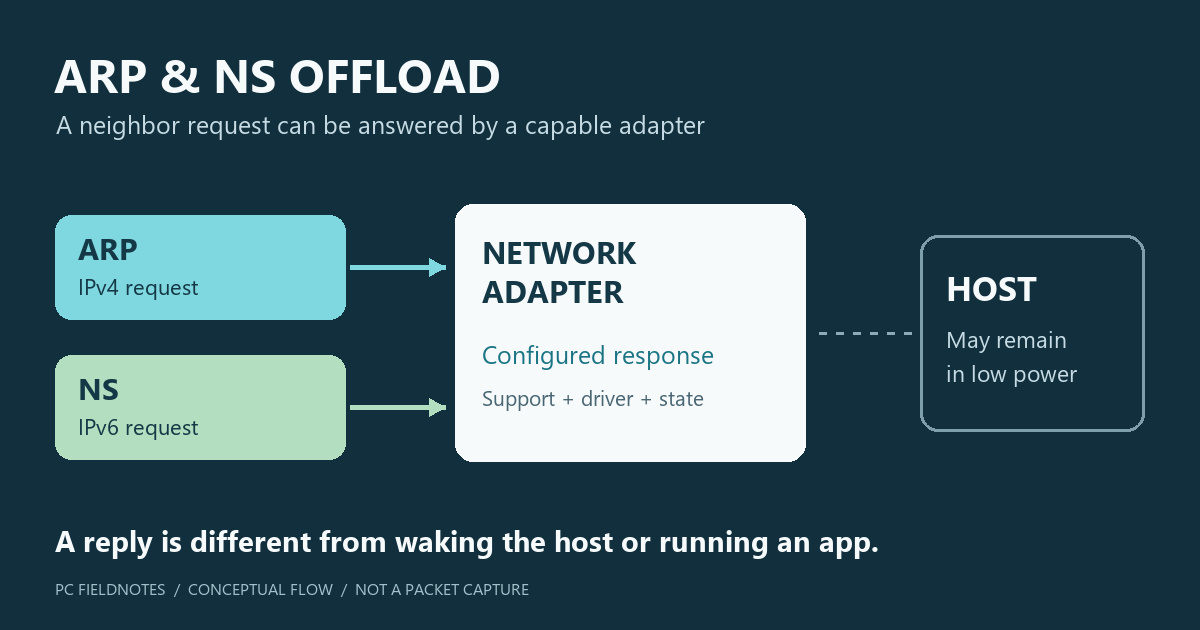
Keep ARP Offload and NS Offload at your PC or adapter manufacturer's supported defaults unless you are investigating a specific sleep-related problem. On capable hardware, these features let the network adapter answer certain IPv4 or IPv6 neighbor requests while the host remains in a low-power state. Their purpose is to avoid unnecessary wake-ups, not to increase an active game's connection speed.
If the PC wakes unexpectedly, identify the wake source before changing either setting. If the problem is a lost connection after resume, record that separate symptom. This explanation is based on Microsoft and Intel documentation reviewed October 26, 2026; no physical adapter, sleep transition, battery, or gaming test was performed. A virtual machine cannot verify the physical adapter's low-power responses.
Follow one request to see what is being offloaded
Imagine a neighboring device asking for the link-layer address associated with the PC's IPv4 address. With supported ARP offload configured, the adapter can handle that ARP request without asking the sleeping host to process it. NS offload serves the corresponding IPv6 neighbor-discovery role: the adapter can answer a Neighbor Solicitation with a Neighbor Advertisement.
Intel's legacy wireless settings reference documents both abilities and says each requires hardware and driver support. It also shows Enabled as the default for those documented settings. That is useful context, not proof of the factory value or supported behavior of every current Windows 11 PC.
Microsoft's NDIS protocol-offload explanation describes the power-saving reason: routine network requests can otherwise wake a host even when it has no application work to do. The host supplies information for supported offloads; the adapter does not take over every network task. An offload checkbox alone cannot establish which responses are active in a particular sleep state.
Answering a neighbor is different from waking an application
Wake on Magic Packet and wake on a matching network pattern are separate capabilities. Microsoft's power-management keyword reference lists ARP offload, NS offload, magic-packet wake and pattern wake independently. Do not use their names interchangeably.
An adapter answering a neighbor request does not establish that Remote Desktop, a file server, or a download is running on the host. Likewise, an unsuccessful application connection does not prove the adapter failed to answer ARP or NS. These observations refer to different work.
Offloading is not an absolute promise that a request can never wake the PC. Microsoft notes that a packet matching both an offloaded protocol and a wake pattern can result in a response and a wake-up. The configured wake patterns and driver behavior therefore still matter when investigating an unwanted wake.
Nor does enabling NS offload enable IPv6, or disabling it turn off the IPv6 protocol binding. The offload governs who handles a particular low-power response. For protocol-binding questions, use the separate adapter Properties checklist.
Establish which sleep behavior you are investigating
First record the PC model, adapter model, driver version, power source, connection type and exact symptom. Distinguish an immediate wake, a failure to wake remotely, and a connection that fails only after you resume the PC. Changing several properties at once makes these cases harder to separate.
Microsoft documents these read-only powercfg queries:
powercfg /a
powercfg /lastwake
The first reports the sleep states available on the system. The second reports information about the last wake transition. Neither command measures ARP or NS replies on the wire, and an unhelpful last-wake result is not evidence that either offload caused the problem.
For Modern Standby, the adapter, system design and Windows network policy also affect what remains available. Microsoft's Modern Standby networking guidance discusses offload and wake capabilities, as well as disconnected standby behavior. Do not assume every machine keeps the same network access simply because its display is off.
If the PC wakes immediately, continue with the unexpected-wake investigation. If Wi-Fi is missing only after resume, follow the Wi-Fi-after-sleep checks. Those paths address the symptom before treating an offload as its cause.
Use a single-setting comparison only when the evidence calls for it
If the manufacturer or an identified driver issue calls for a comparison, save the exact original ARP and NS values separately. Names may include ARP offload for WoWLAN or NS offload for WoWLAN, and available properties vary. A missing option is a reason to consult the OEM's supported driver documentation, not to add a registry value from another adapter.
Choose one observable result before changing anything: for example, whether the same unintended wake recurs during a comparable idle interval, or whether the same trusted network service works after resume. Keep the access point or switch port, power source, driver and wake settings unchanged. Change only the property being investigated, apply it using the supported controls, and repeat the same observation.
Save the result with its limits. “The PC stayed asleep during this interval” does not prove that every ARP request was offloaded. “The service worked after resume” does not prove that it was available during sleep. A packet-level claim needs an appropriately placed capture and a verified host power state; this guide contains neither.
If there is no repeatable improvement, restore the original value and confirm normal sleep and networking. On a managed PC, give the observations to the administrator rather than applying a general script that disables every power-management feature.
Keep gaming latency separate
These documented features concern low-power protocol handling. That description provides no measured basis for claiming lower ping or higher frame rates from disabling them during active use. A speed or latency problem while the PC is awake needs its own repeatable diagnosis.
Keep battery, unwanted-wake and connectivity observations separate when reporting a comparison. Include the adapter and driver details, which property changed, and the exact symptom that repeated or stopped. Leave IP addresses, MAC addresses and private device names out of public screenshots.
