
 Documentation-based
Wireshark project documentation and Microsoft NetAdapter/NDIS references reviewed October 22, 2026 with AI assistance. No packet capture, Windows 11 VM, physical NIC or performance test was performed. Alex Reed is an established pen name.
If Wireshark flags incorrect TCP checksums on packets sent by the same Windows PC that is recording the capture, check checksum offloading before blaming the cable or replacing the adapter. The capture can contain an outgoing packet before the NIC finishes its checksum. First identify the capture interface, traffic direction and exact checksum status.
That explanation has a boundary: a local send-capture artifact does not excuse every bad checksum. Separate traffic received from another host, partial checksums recognized by Wireshark, and any independently observed application failure. A warning in one local trace is evidence to interpret, not a hardware diagnosis.
Start with the observation that produced the warning
Wireshark's own incorrect TCP checksum FAQ identifies checksum offloading as the likely explanation when the affected packets are all being sent by the capturing machine. Read the packet's source and destination in the context of the interface you selected. Do not assume the PC is the sender just because Wireshark is running on it.
Use this matrix to choose the next question. The actions are a diagnostic plan based on the documented capture mechanism, not results from a reproduced fault.
| Observation | What it establishes | Next check |
|---|---|---|
| Warnings occur on locally generated outgoing TCP traffic | The documented pre-NIC capture explanation fits | Record offload state and the analyzer's validation preference |
| The status explicitly identifies a valid partial checksum | The analyzer recognizes an unfinished offload contribution | Keep that label distinct from an invalid final checksum |
| Warnings concern traffic received from another host | The local sender explanation is insufficient | Check capture location, complete packet data and an independent view |
| The application also fails | There is a symptom beyond the display annotation | Match the failed operation to the relevant connection and time |
| Only the warning disappears after changing an analyzer preference | The analysis settings changed | Do not report a repaired network without separate evidence |
For a bridged, virtual or VPN interface, write down that topology too. A description such as “captured on my laptop” leaves out where the traffic was actually observed.
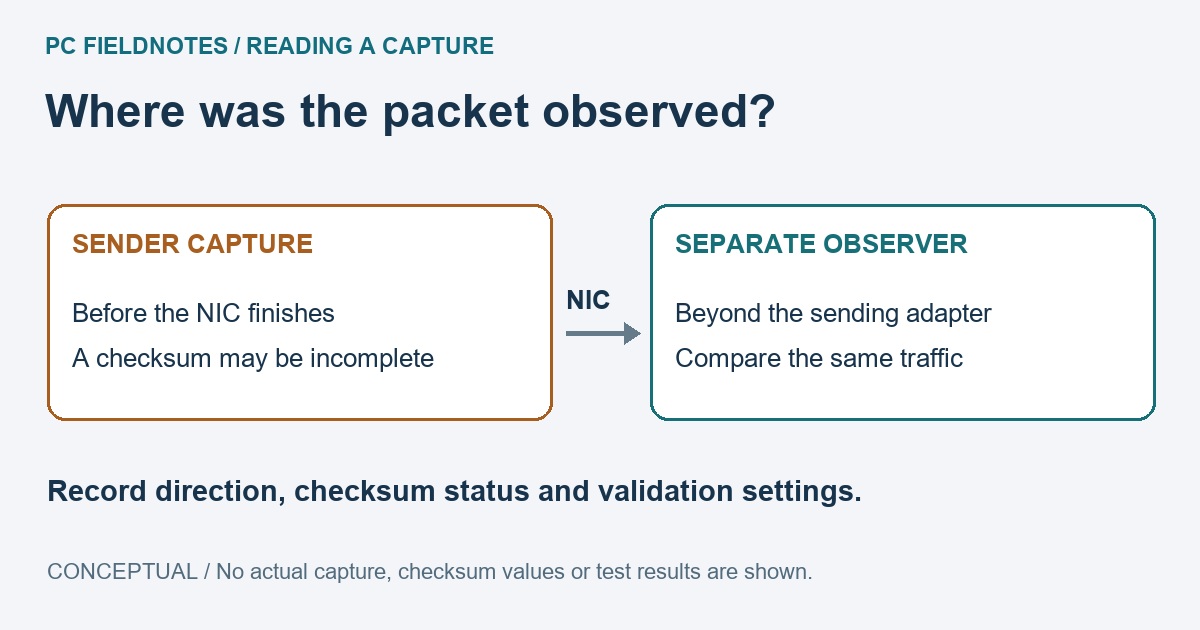
A capture can precede checksum completion
Microsoft's NDIS checksum-task documentation describes the transport placing a preliminary contribution from the TCP pseudoheader into the checksum field. The NIC completes the calculation for the transmitted packet. The software's earlier view can therefore differ from the completed packet.
The two observation points in this page's illustration are conceptual. If you need to distinguish a local capture artifact from invalid traffic reaching the peer, compare the same connection from an authorized observation point beyond the sending adapter. Match the operation and direction; two unrelated traces cannot settle the question. Keep the original capture and record how each was collected. No second capture was made for this article.
The Wireshark offloading notes also discuss unusual capture appearances caused by segmentation offloads. If large packets appear in a local trace, do not change the path MTU solely to match the displayed size. Large Send Offload explains send segmentation; that is a different question from whether a captured TCP checksum has reached its final value.
Check the exact status and version
The current Wireshark checksum guide says Wireshark 4.2.0 and later can recognize the partial checksum contribution used by Windows and Linux. During TCP/UDP validation, supported partial checksums are identified as valid but partial and remain eligible for reassembly. This is more specific than calling every offloaded packet bad.
Record your installed version, whether TCP checksum validation is enabled and the actual status text. The guide notes that recent releases disable checksum validation by default, but a saved profile may differ. Do not infer your own preference from the documented default or rely on an old screenshot of a differently worded control.
The same guide explains why validation matters to analysis: a checksum classified as invalid can prevent reassembly. Before interpreting a missing reconstructed conversation as a network failure, preserve the original preference and determine whether checksum classification affected that analysis.
Read Windows offload settings without changing them
Use the connection name you identified for the capture. Replace Ethernet with that name in this documented read-only PowerShell command:
Get-NetAdapterChecksumOffload -Name "Ethernet"Microsoft documents the supported settings and this lookup in Get-NetAdapterChecksumOffload. Preserve the returned IPv4, TCPv4, TCPv6, UDPv4 and UDPv6 information as available for that adapter. Transmit and receive settings, protocols and hardware capabilities are not interchangeable. An enabled offload is context for the capture, not proof that the adapter produced an error.
If the adapter name is wrong or the lookup fails, keep the exact error and check the adapter and driver documentation. The command shown here is reference syntax, with no fabricated Windows 11 output. A virtual adapter's settings cannot establish the physical NIC's behavior.
A quieter analyzer is not a repaired link
Wireshark's FAQ describes disabling its TCP checksum-validation preference as a way to avoid misleading local warnings and related reassembly problems. That changes how Wireshark analyzes the capture; it does not repair packets, alter the saved trace into a new wire capture, or prove that the remote endpoint received correct traffic. Note the preference change when sharing an analysis and restore it when the next investigation requires validation.
Avoid starting with a bundle of NIC toggles. Microsoft notes that when LSO remains enabled, disabling checksum offload alone does not stop checksum insertion for LSO-generated packets. One switch is not a complete description of the send path. A driver-level comparison needs an exact configuration record, a specific fault and a controlled rollback; a working connection does not need retuning just to remove an annotation.
Sources reviewed October 22, 2026. Recheck after a Wireshark validation change or a relevant driver update. No capture, VM demonstration or hardware fault reproduction was performed. A Windows 11 VM cannot prove physical-adapter behavior, and a raw capture should remain private until sensitive traffic and identifiers have been reviewed.
Related offload reading: use TCP and UDP checksum-offload controls for reading and restoring the separate protocol and Rx/Tx values, or Large Send Offload for the separate TCP-segmentation setting. Keep those configuration questions distinct from what the capture point observes.
