
 Documentation-based
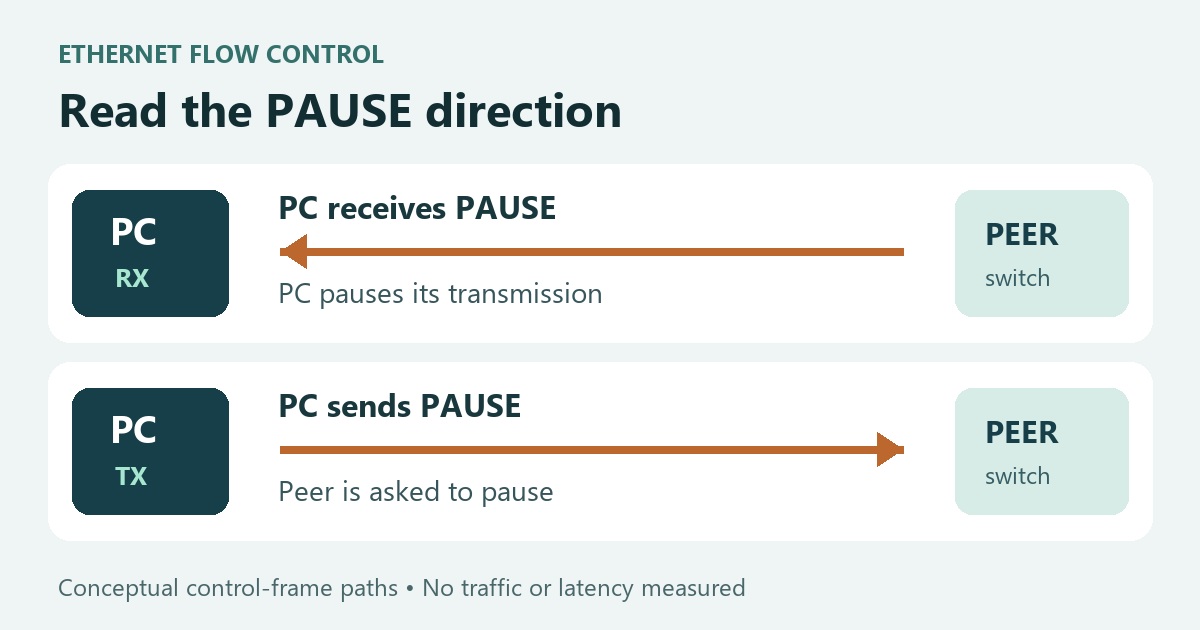
Intel, Dell and Microsoft documentation reviewed October 24, 2026 with AI assistance. No Windows 11 VM, physical NIC, dock, PAUSE-frame capture, gaming or latency test was performed. Alex Reed is an established pen name.
For a working Windows 11 Ethernet connection, keep the adapter or PC maker's supported Flow Control setting unless you have a specific fault to investigate. There is no single on/off choice for every adapter. First record the existing value: Rx Enabled, Tx Enabled and Rx & Tx Enabled describe different PAUSE-frame behavior, so they are not interchangeable baselines.
Before disabling anything, check for model-specific guidance. Dell documents intermittent Ethernet disconnections when Flow Control is disabled on certain WD-series docks. A generic gaming-settings list is a poor reason to override that guidance.
Read Rx and Tx from the PAUSE frame's direction
Ethernet flow control lets a device ask its link partner to pause transmission. Intel's Ethernet adapter guide describes adapters sending flow-control frames when their receive queues reach a limit, and responding to incoming frames by temporarily pausing packet transmission. The link partner must support the feature.
The names can be misleading: receiving a PAUSE frame can pause your PC's outgoing data. Transmitting a PAUSE frame asks the other end to pause its outgoing data toward your PC. Rx and Tx here describe the control frame, not a switch that turns ordinary downloads or uploads off.
Intel's 10 Gigabit adapter reference explicitly maps the Rx/Tx labels. The meanings below do not imply that those adapters' defaults apply to your PC.
| Driver value | PAUSE behavior at this adapter |
|---|---|
| Disabled | Neither generate nor respond to PAUSE frames through this control |
| Rx Enabled | Honor received PAUSE frames; temporarily pause outgoing transmission |
| Tx Enabled | Generate PAUSE frames when the local receive side needs relief |
| Rx & Tx Enabled | Enable both responses and generation |
Drivers may instead use labels such as Generate, Respond, or a single Enabled value. Intel's advanced Ethernet settings reference explains those actions and notes that available settings vary with the device and Windows version. Use your driver's description rather than assuming another manufacturer's menu is identical.
The selected property is a configuration value. It does not establish whether a PAUSE frame was exchanged during your workload. Likewise, choosing Disabled does not demonstrate that an Internet service, game server or distant bottleneck will become faster.
A documented reason to leave it enabled
Dell's WD-series dock advisory specifically lists WD19, WD19S, WD19DC and WD19DCS. It describes intermittent disconnections after Flow Control is disabled on the Realtek USB GbE Family Controller, and instructs affected users to enable it and restart.
That is a vendor-documented case, not a PC Fieldnotes reproduction. It is also not evidence that every Realtek adapter or USB dock has the same requirement. Match the dock model, adapter and symptom before applying the advice. For a different product, look for its own OEM instructions.
If your complaint is that the link negotiates at 100 Mbps, start with the 100 Mbps Ethernet checks. If the connection repeatedly disappears, use the Ethernet disconnection guide to separate the adapter, cable and port symptoms. Flow Control is not a substitute for identifying the fault.
Identify the actual adapter and save its starting value
In Windows 11, open Device Manager → Network adapters, then the physical Ethernet adapter's Properties → Advanced. Look for Flow Control if the driver exposes it. Check the Driver tab for provider, date and version. A dock's Ethernet controller can be a different device from the laptop's built-in Ethernet port.
For a read-only inventory, open PowerShell and run:
Get-NetAdapter
Get-NetAdapterAdvancedProperty -Name "Ethernet" |
    Format-List DisplayName, DisplayValue, RegistryKeyword, ValidDisplayValues
Replace Ethernet with the exact name from the first command. This lists settings; it does not change them. Microsoft's Get-NetAdapterAdvancedProperty documentation explains the displayed driver properties and valid-value fields. Property names can be localized. If the driver does not expose Flow Control, do not invent a registry entry to copy somebody else's configuration.
Save the original label and value, adapter model, driver version and the port you are using. For example, a record that starts at Rx Enabled must return to Rx Enabled after an inconclusive comparison. “Turn everything back on” would change that starting state.
Make a comparison answer one concrete question
Consider a change only when the manufacturer permits it and you can repeat a specific symptom. Define the question first: does a local file transfer stall, does the adapter disconnect, or does an application fail during that same transfer? “Is this setting better?” has no clear pass condition.
Use a local session with a recovery path. Changing an adapter property may interrupt connectivity, so avoid experimenting through the only remote connection to the PC. On a managed network, involve its administrator before changing adapter or switch settings.
Keep the cable, peer, workload and other advanced settings fixed. Record the original run, change only Flow Control, reconnect or restart if the driver requests it, then read back the selected value before repeating the same workload. Note the symptom and any new failures, not just one speed-test number. Stop if the connection becomes unstable.
If the symptom does not reproducibly improve, restore the exact original value, read it back and confirm normal connectivity. Even a repeatable difference supports a conclusion about that adapter, driver and workload; it does not establish a universal Windows 11 gaming recommendation.
*Documentation reviewed October 24, 2026. This guide includes an original conceptual diagram and an editorial comparison plan. No physical NIC, dock, PAUSE-frame capture, gaming or latency test was performed. A virtual machine cannot validate the physical adapter and link-partner behavior described here.*
