
 Documentation-based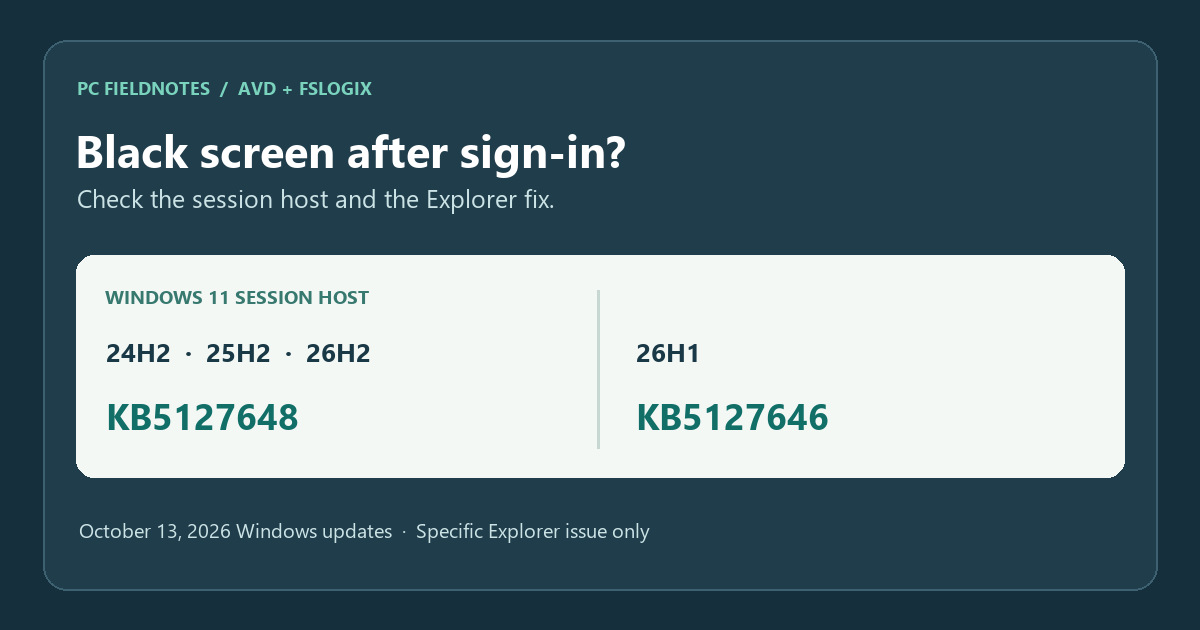
Microsoft KB5127648, KB5127646, earlier known-issue entries, AVD and FSLogix guidance reviewed October 15, 2026 with AI assistance. Documentation-based; no host update or resolved session was tested. Alex Reed is an established pen name.
If an Azure Virtual Desktop (AVD) user signs in but sees a black screen instead of a desktop, and Explorer.exe fails to start or repeatedly crashes on the session host, check the host's installed Windows update. Microsoft says its October 13, 2026 updates fix this particular Windows Explorer issue in multi-user environments that include AVD and FSLogix. A black screen by itself does not prove this is the cause.
For Windows 11 24H2, 25H2 and 26H2, the October update is KB5127648. For the distinct 26H1 branch, it is KB5127646. Have an administrator check the AVD session host, not just the user's local device. The organization should deploy the applicable supported update through its normal host-servicing process.
Match the failure before changing a host
Microsoft described the earlier failure as a desktop that did not load automatically after sign-in. It was primarily observed on AVD hosts using FSLogix, appeared more often with some existing profiles, and could coincide with Explorer crashes in the Application event log. The earlier 24H2/25H2 known-issue entry now states that updates released on or after October 13, such as KB5127648, resolve that issue. The 26H1 entry gives the corresponding KB5127646 resolution.
Use this short incident fingerprint to decide whether the notice is relevant:
- The connection reaches sign-in; the failure is the desktop loading after authentication, rather than an RDP connection refusal or a black screen before credentials.
- The affected machine is a Windows 11 AVD session host, particularly one using FSLogix. Record the host's exact version and OS build.
- The session has a black screen or needs Explorer started manually. Check whether the Application log records an Explorer.exe failure at the same time.
Those observations justify checking this Microsoft notice. They do not make every black screen a Windows-update regression. For a connection that fails before the desktop session with 0xC000000D, see our separate Remote Desktop error guide.
Map the host version to the October fix
| Windows 11 version on the AVD host | October 13 update | Build shown in Microsoft's update notes |
|---|---|---|
| 24H2 | KB5127648 | 26100.9711 |
| 25H2 | KB5127648 | 26200.9711 |
| 26H2 | KB5127648 | 26300.9711 |
| 26H1 | KB5127646 | 28000.3231 |
These are the October release builds, not a promise that every host has installed them. The 24H2/25H2/26H2 numbers come from KB5127648's heading and applicability; the 26H1 number comes from KB5127646. On an affected host, an administrator can use Settings > System > About for version/build and Settings > Windows Update > Update history for the installed KB. If the pool uses image-based deployment, check the image and the actual host that served the failed session; a newly updated image does not prove every running host was replaced.
Microsoft documents both patch-in-place and image-based approaches for AVD session-host updates. Use the organization's approved maintenance window and change process, with a test host or pool where appropriate. This guide does not choose a deployment method for an unknown environment or instruct end users to patch a shared host.
Retest the same sign-in path
After IT confirms the applicable October update or a later cumulative update on the session host, repeat a sign-in with an affected user profile through the same AVD resource. Record the date, session host, Windows version/build, installed KB, user-profile type and whether the desktop appears without manually starting Explorer. Compare the Application log around the failed and retested sign-ins for Explorer.exe crashes. A successful login on a different host or with a new profile is useful comparison data, but it does not by itself prove the original path recovered.
Microsoft's October release note says this specific Explorer problem is fixed. It does not say that every AVD or FSLogix black screen has the same cause. If a patched host still shows a black screen, confirm which host received the session and gather its Application and FSLogix logs before escalating. Microsoft's FSLogix logging guide identifies the FSLogix Event Viewer logs and the profile text logs. The site's event-log guide is a general starting point; it does not replace the AVD host record.
The FSLogix known-issues page still labels a similar September 2026 black-screen entry “In progress” in the version reviewed October 15. Its entry was updated in September. The later Windows KBs explicitly say the Explorer issue was fixed on October 13. Treat the document dates and product scope separately; do not use the older FSLogix page to claim the Windows fix was never released, or the Windows KB to claim every FSLogix issue is resolved.
Scope and evidence
Reviewed October 15, 2026 against the Microsoft update notes and AVD/FSLogix documentation linked above. This is a documentation-based incident guide. PC Fieldnotes did not reproduce an AVD host failure, deploy the update to a host pool, or observe a successful post-update login. The cover is an editorial diagram, not a captured session. Recheck Microsoft's current update notes before using the KB map in a later maintenance cycle.
