
 Documentation-based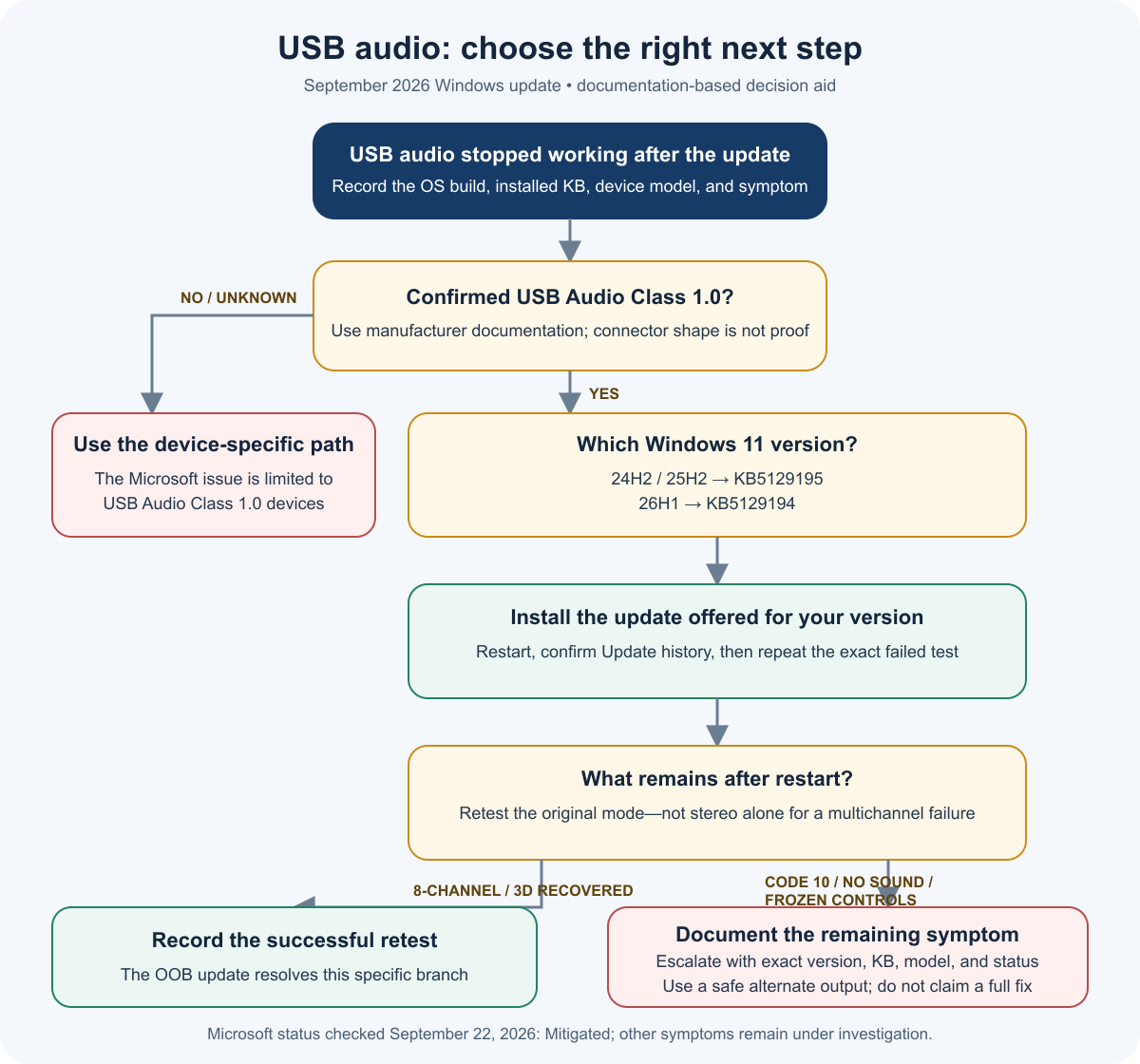
Based on Microsoft release-health and support documentation reopened September 22, 2026. No hands-on hardware test was performed.
Last reviewed: September 22, 2026
If a USB audio device stopped working after the September 8, 2026 Windows security update, first confirm that the device uses USB Audio Class 1.0 and note your Windows version. Microsoft currently marks the issue as Mitigated, not fully resolved. The September 14 out-of-band update fixes the 8-channel and 3D-audio failure, but Microsoft still lists Code 10, no output, frozen volume controls, and unavailable Sound settings as unresolved symptoms.
For Windows 11 24H2 or 25H2, the relevant out-of-band update is KB5129195. Windows 11 26H1 uses a different update, KB5129194. Install the update offered for your own Windows version, restart, and test the exact playback mode that failed. Do not assume that a successful installation means the device recovered.
Check whether your device matches the known issue
This article covers a specific update regression. It does not cover every USB headset, DAC, microphone, dock, or audio error.
Before changing drivers or removing updates, record these details:
- Press
Win + R, enterwinver, and save the Windows version and OS build. - Open Settings > Windows Update > Update history and note the September update and any later cumulative or out-of-band update.
- Open Device Manager, find the affected audio device, open Properties, and copy the full Device status message.
- Record the device manufacturer and model.
- Check the manufacturer's specifications or support page for evidence that it uses USB Audio Class 1.0.
USB Audio Class 1.0 describes an audio-device standard. It does not mean the device is connected to a USB 1.x port, and the connector shape does not prove which audio class the device uses.
The timing matters. Microsoft associates the Windows 11 24H2 and 25H2 issue with KB5124008, released September 8. The corresponding 26H1 update is KB5124012. A Code 10 message by itself is not enough to identify this regression; Microsoft also documents Code 10 as a general Device Manager error that can have other causes.
Match your symptom to the next step
| What you observe | Does it match the known issue? | Current official status | Next safe action |
|---|---|---|---|
| Stereo works, but 8-channel or 3D audio fails | Yes, if the device is confirmed as USB Audio Class 1.0 and the failure began after the September update | Microsoft says this branch is resolved by the September 14 out-of-band update | Install the update for your Windows version, restart, then retest the original multichannel mode |
| Device Manager shows “This device cannot start (Code 10)” | It can match, but Code 10 is not unique to this bug | Still listed under the mitigated issue | Save the exact status, install the applicable update, restart, and report the remaining failure if it persists |
| The device starts but produces no sound | It can match when the affected device is USB Audio Class 1.0 | Not listed as resolved by the out-of-band update | Confirm the selected output, test a known-working output path, and record the result |
| Volume remains at zero or Sound settings do not respond | Yes, these are listed symptoms | Not listed as resolved by the out-of-band update | Avoid repeatedly opening a frozen panel; record the symptom and use a temporary alternative output if available |
| The device is not USB Audio Class 1.0, or its class is unknown | Not enough evidence to match this issue | Outside the confirmed scope | Check the manufacturer documentation and investigate the device-specific path |
This table is a decision aid based on Microsoft's current documentation. PC Fieldnotes did not reproduce the failure on physical hardware for this draft.
The flow separates the documented multichannel fix from the symptoms Microsoft still lists as unresolved. It is a documentation-based aid, not evidence that a particular device has been tested.
Install the update for your Windows version
Open Settings > Windows Update and select Check for updates. Install the latest cumulative update offered for the PC, then restart even if audio appears to return before the restart.
Use the version reported by winver to avoid mixing packages:
| Windows version | September 8 update linked to the issue | September 14 out-of-band update |
|---|---|---|
| Windows 11 24H2 | KB5124008 | KB5129195 |
| Windows 11 25H2 | KB5124008 | KB5129195 |
| Windows 11 26H1 | KB5124012 | KB5129194 |
Windows 11 26H1 is a hardware-specific release supplied on selected new devices. It is not a normal feature update offered to existing 24H2 or 25H2 PCs. Do not install a 26H1 package on a 24H2 or 25H2 system.
After the restart, return to Update history and confirm that the expected update appears as installed. Then repeat the exact test that originally failed. For a multichannel device, testing ordinary stereo alone does not confirm that 8-channel or 3D audio recovered.
If the USB audio device is still silent
First, determine whether Windows can use another output. Select the PC's built-in speakers, a 3.5 mm output, or another known-working device if one is available. This keeps the computer usable while separating a system-wide playback problem from the affected USB path. A temporary alternative is not a repair for the USB device.
If the USB device starts and its controls expose a channel-mode choice, two-channel stereo may be a temporary workaround for the multichannel symptom. Microsoft reports that some customers restored audio this way, and the later update is intended to resolve that specific branch. Do not present stereo mode as a fix for a device that remains in Code 10 or never starts.
Check that the intended device is selected under Settings > System > Sound only if the page responds. If the page freezes or remains unavailable, stop repeating the same action and record that behavior. Also record whether disconnecting and reconnecting the device or restarting Windows changes the result.
Avoid downloading drivers from third-party driver sites. If the manufacturer provides a package for the exact device and Windows version, keep its source URL and version number in your notes. Do not disable driver-signature or other Windows security protections. This article also does not recommend uninstalling the September security update as a routine first step.
Verify the result and prepare a support report
Use the same test before and after the update so the comparison means something. Record the result rather than writing only “still broken.”
Copy this form into your notes:
| Field | Your result |
|---|---|
| Windows version and OS build | |
| September security update | |
| Later cumulative or out-of-band update | |
| USB audio device manufacturer and model | |
| Evidence for USB Audio Class 1.0 | |
| Driver version | |
| Device Manager status before and after | |
| Stereo playback result | |
| 8-channel or 3D-audio result, if supported | |
| Volume and Sound settings behavior | |
| Result after restart and reconnection |
For a home PC, use the Windows Get Help app, Microsoft Support, or the hardware manufacturer's support channel. Send the version, installed KBs, device model, exact Device Manager message, and the before-and-after results. Microsoft directs IT administrators who need help with the remaining symptoms to Support for Business.
Questions about the partial fix
Does KB5129195 fix every USB audio Code 10 error?
No. Microsoft says KB5129195 resolves the 8-channel and 3D-audio symptom for Windows 11 24H2 and 25H2. Its current release note still lists Code 10, no output, frozen volume controls, and unavailable Sound settings under known issues.
Is every USB headset affected?
No. Microsoft's confirmed scope is some USB Audio Class 1.0 devices. A USB connector, headset label, or Code 10 message alone does not prove that a device is part of this regression.
Is USB Audio Class 1.0 the same as USB port speed?
No. The audio class describes how the device presents audio functions to the operating system. It is not the same as the USB connector type or the port's advertised data rate.
Sources and maintenance note
Official sources were reopened on September 22, 2026. Microsoft still marks the overall USB audio issue as mitigated and says it is working on the remaining symptoms. This page should be reviewed daily while that status remains unchanged, and immediately before any CMS upload or publication. No hands-on hardware test or original Windows screenshot was completed for this draft.
- Microsoft: Windows 11 25H2 known issues
- Microsoft: KB5129195 for Windows 11 24H2 and 25H2
- Microsoft: Windows 11 26H1 known issues
- Microsoft: Device Manager error codes
