 Documentation-based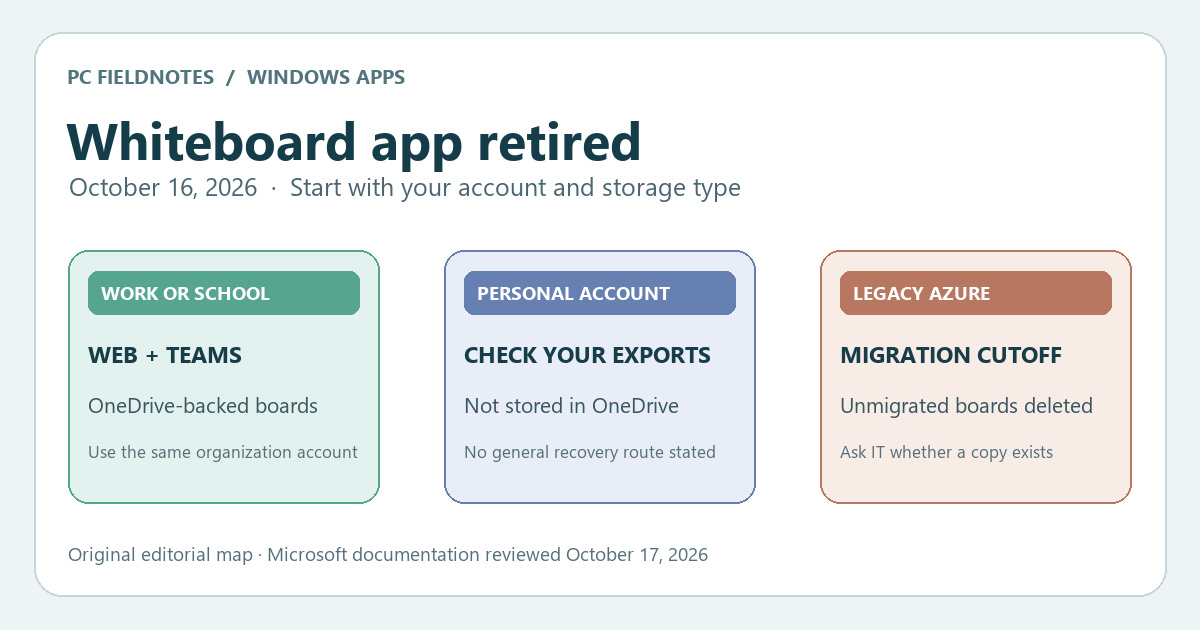
Microsoft standalone-app retirement, Azure-to-OneDrive migration, and OneDrive whiteboard location pages reviewed October 17, 2026 with AI assistance. Documentation-based guide; no tenant, personal account or board recovery tested. The migration article conflicts on the standalone-app date; the dedicated retirement page supplies October 16. Alex Reed is an established pen name.
If the Microsoft Whiteboard app on your Windows PC now shows a retirement screen instead of your boards, do not treat that screen as proof the boards were deleted. Microsoft retired the standalone Windows, iOS, and Android apps on October 16, 2026. For a work or school account, open Whiteboard on the web or in Microsoft Teams with the same organization account; OneDrive-backed boards remain available through those supported entry points. For a personal Microsoft account, Microsoft's retirement notice does not identify an equivalent replacement route. Personal boards are not stored in OneDrive, so signing into a personal OneDrive and finding no .whiteboard file does not diagnose what happened to them.
The account type and the board's storage history matter more than reinstalling the Windows app. Microsoft's standalone-app retirement notice says an already-installed app can remain on the device but shows the retirement experience instead of opening the gallery or board content. This is a service change, not an instruction to repair the app installation.
Choose the path for your account
| What you used to sign in | What Microsoft documents after October 16 | First check |
|---|---|---|
| Work or school account, OneDrive-backed board | Whiteboard continues on the web and in Teams; the standalone app is retired. | Sign in with the same organization account and check the web gallery or Whiteboard in Teams. |
| Personal Microsoft account | The standalone apps are retired. The notice does not provide a personal-account replacement or recovery procedure. | Check whether you previously exported or shared a copy, then ask Microsoft Support about account-specific options. Do not assume personal OneDrive contains the boards. |
| Older work or school board still stored in Azure and never migrated | Microsoft says remaining Azure boards were permanently deleted on October 16 and cannot be recovered. | Ask your organization's administrator to confirm whether a OneDrive copy was migrated before the cutoff. |
This split prevents two opposite mistakes: calling every missing board permanently lost, or promising that every board is waiting in OneDrive. Neither follows from the retirement screen alone.
Find a work or school board without the Windows app
Use a browser to open Whiteboard on the web, or open Whiteboard in Microsoft Teams. Microsoft's retirement notice lists the web gallery, the Whiteboard app in Teams, a meeting board, and a Whiteboard tab in a Teams chat as supported work or school entry points. Sign in with the same tenant and account that owned or received the board. A personal Microsoft account with a similar email address is not a substitute for the organization identity.
For a board you own, also check your organization's OneDrive → Whiteboards folder for a .whiteboard file. Microsoft's OneDrive file guide describes that folder for work or school boards. A board someone else shared may be easier to reopen from the original Teams meeting, chat tab, or sharing link than from your own Whiteboards folder. If a link opens the wrong account, switch to the organization account before concluding that the file is missing.
If the board is still absent, record its title, approximate creation date, owner, the Teams meeting or chat where it appeared, the account used, and the exact message. Ask your IT administrator to check the owner's OneDrive and sharing permissions. Do not post confidential board contents or tenant details in a public support thread. Reinstalling the retired app is unlikely to answer a storage or permission question because the installed app no longer opens the gallery.
Separate old Azure boards from current OneDrive boards
Microsoft's Azure-to-OneDrive migration schedule describes a different cutoff from the app retirement. Migration of remaining Azure-based work or school boards ended September 25, 2026. Microsoft says boards that stayed in Azure became read-only, could be viewed or exported through October 16, and were permanently deleted on October 16 if not migrated. Its notice says those remaining Azure boards cannot be recovered. It does not say that already-migrated OneDrive copies were deleted when the standalone app retired.
If you know a board was created before the move to OneDrive, have the administrator check whether it was migrated or whether a copy or export exists. Microsoft's page lists tenant inventory and migration-mapping tools for administrators, but their results need to be interpreted against the actual owner and file history. A missing board in the Windows app is not enough to determine its storage location. Do not follow old instructions to trigger migration now; that deadline has passed.
The migration article also contains an older sentence that gives September 14 as the standalone-app retirement date. The dedicated retirement page repeatedly gives October 16. This guide uses the dedicated page for the app date and the migration page for Azure-board deadlines; the conflicting sentence is a documentation inconsistency, not evidence of a second repair window.
If you used a personal Microsoft account
Microsoft explicitly includes personal accounts in the app retirement. Its OneDrive whiteboard guide explicitly says personal-account boards are not stored in OneDrive. The work or school instructions above therefore should not be presented as a personal-board recovery method.
Look for an export, image, or copy you made before retirement and any link you previously shared. Keep the retired app installed until you have accounted for the material you need, but do not assume the app itself can reopen the gallery. Contact Microsoft Support with your account type, the last date you opened the board, and the exact retirement message to ask what, if any, account-specific options exist. The official retirement notice reviewed here gives no general recovery promise for personal boards; we have not verified one by logging into a personal account.
Evidence boundary: This guide compares Microsoft support pages as reviewed October 17, 2026. We did not access an organization's tenant, migrate a board, or test personal-account recovery. A board's actual availability must be checked in the correct account and storage location. For other Windows changes, the site's Windows 11 guides are separate from this Whiteboard service retirement.
